Reading a Fish Finder for Crappie
You know that feeling when you're out on a Mississippi lake, searching for those elusive crappie, and it feels like they've vanished into thin air? It's frustrating, especially when you know they're somewhere down there. Modern fish finders are a game-changer for crappie anglers, but simply having one isn't enough; you need to know how to interpret the information it's feeding you. This comprehensive guide will demystify your fish finder, helping you effectively read its display to locate crappie and their preferred habitat in Mississippi's diverse waters.
Understanding the Basics of Your Fish Finder System
Before you can truly master the art of finding crappie with your electronics, it's essential to grasp the fundamental principles of how your fish finder works. It's more than just a screen; it's a sophisticated system designed to paint a picture of the underwater world beneath your boat. Without a solid understanding of these core components and their functions, you'll constantly be second-guessing what you see.
How Sonar Technology Works Underwater
At its heart, a fish finder operates on sonar (Sound Navigation and Ranging) technology. It sends out sound waves from a transducer, which is typically mounted on your boat's transom, trolling motor, or inside the hull. These sound waves travel through the water until they strike an object – be it the lake bottom, a submerged tree, a brush pile, or a school of crappie – and then bounce back to the transducer. Your fish finder unit measures the time it takes for these sound waves to return and uses that information to calculate the depth and location of the objects. The stronger the return signal, the denser the object, often indicating a solid structure or a tightly packed school of fish. Think of it like shouting into a canyon and waiting for the echo; the longer it takes, the further away the wall is.
The frequency of these sound waves also plays a critical role. High-frequency beams (like 200 kHz) offer more detail and better target separation, making them excellent for identifying individual fish or distinguishing a crappie from a limb in a brush pile, especially in shallower water. However, they don't penetrate as deep and are more susceptible to interference. Low-frequency beams (like 50 kHz or 83 kHz) sacrifice some detail but can penetrate much deeper and cover a wider area, which is great for finding structure in deep reservoirs like Ross Barnett Reservoir or searching for baitfish schools across a broad expanse. Many modern fish finders offer CHIRP sonar, which sends out a range of frequencies, providing the best of both worlds with incredible detail and depth penetration.
Different Types of Fish Finder Displays
Today's fish finders come equipped with various display types, each offering a unique perspective of the underwater environment. While traditional 2D sonar is still foundational, newer technologies like Down Imaging and Side Imaging have revolutionized how we find fish. Understanding the strengths of each is key to maximizing your crappie-finding efforts.
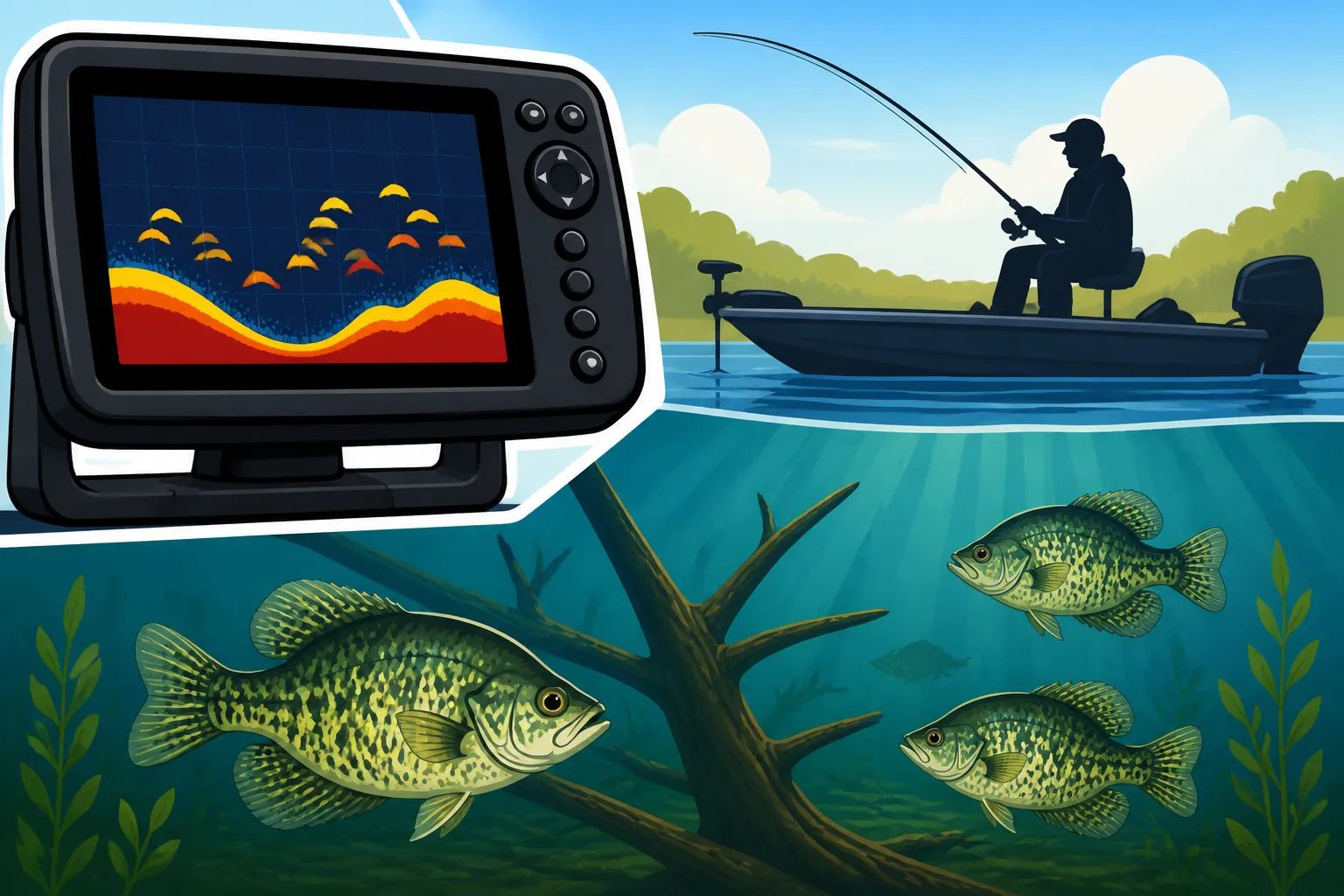
Traditional 2D Sonar (often called "Broadband" or "CHIRP Sonar") displays what's directly beneath your boat as a scrolling history. Fish appear as arches or lines, while structure shows up as irregular shapes. It's excellent for understanding depth, detecting vertical structure, and seeing fish in the water column. For crappie, you'll often see clusters of arches around brush piles or suspended above creek channels.
Down Imaging (also known as DownScan, ClearVü, or StructureScan Down) provides a picture-like view of what's directly below your boat. It uses a very thin, high-frequency beam to create incredibly detailed images of structure and fish, almost like a photograph. This makes it much easier to differentiate between a brush pile, a sunken boat, or a rock pile. When targeting crappie, Down Imaging helps you discern individual fish within a dense brush pile, showing you exactly where they are holding tight to cover.
Side Imaging (SideScan, StructureScan, Mega Imaging) takes sonar imaging to the next level by scanning out to the sides of your boat, not just directly underneath. This creates a wide, panoramic view of the bottom and structure up to several hundred feet on either side. For crappie anglers, Side Imaging is indispensable for efficiently scouting large areas for submerged timber, ledges, humps, and brush piles that might be missed by 2D or Down Imaging. You can cover expansive flats on lakes like Grenada Lake or Sardis Lake quickly, marking promising spots with waypoints before moving in for a closer look with your other sonar views. Many anglers find the ability to find "hidden" crappie structures far from obvious shorelines a game-changer with this technology.
Interpreting What You See: Key Crappie Signatures
Once you've got a handle on the basic technology, the real skill comes in interpreting the images on your screen. Your fish finder isn't just showing you random blips; it's revealing patterns, shapes, and densities that tell a story about what's below. Learning to "read" these signatures is paramount for consistently locating crappie.
Identifying Crappie Arches and Marks
On your traditional 2D sonar, fish typically appear as arches. The completeness and thickness of an arch depend on several factors, including the fish's size, how long it stays in the sonar cone, and its position relative to the center of the cone. A full, bold arch usually indicates a larger fish that passed directly through the center of your sonar beam. Smaller arches or mere lines can still signify fish, especially smaller crappie or those on the periphery of the beam.
When looking specifically for crappie, you'll often see them grouped together. They are schooling fish, so isolated arches are less common than clusters. Look for "Christmas tree" patterns on your screen, which often represent a tight school of crappie holding vertically in the water column or tightly congregated around a piece of submerged structure. The color palette on your screen can also provide clues: brighter, more intense colors typically denote stronger returns, indicating a denser object or a larger fish. Many modern units, readily available on platforms like Amazon, allow you to customize these color palettes to enhance visibility, which can make a big difference in different lighting conditions.
Distinguishing Fish from Structure
This is often where anglers get frustrated. Is that a fish, or just a branch? Is that a school of crappie, or a dense brush pile? Your fish finder will display both structure and fish, and learning to tell them apart is crucial.
Structure, such as submerged timber, rock piles, or old roadbeds, generally appears as a consistent, irregular shape on your screen, often with a harder, denser return than individual fish. On 2D sonar, a brush pile might look like a blobby, bright mass on the bottom or suspended in the water column. On Down Imaging, it will look much more detailed, like an actual underwater tree or a pile of sticks. Side Imaging will give you the most realistic view, showing shadows cast by the structure, which helps determine its height and shape.
Crappie, when around structure, will often appear as distinct marks or arches on or around that structure. On Down Imaging, you might see tiny, bright specks that are clearly separate from the structure itself, often hovering just above, within, or to the sides of a brush pile. If you see a dense blob of structure with a scattering of individual bright marks around its edges or within its branches, you've likely found crappie holding tight to cover. This is particularly important when you're targeting specific brush piles in places like Sardis Lake or Enid Lake. Sometimes, you'll even see them suspended just above the thermocline if you're fishing deeper areas in summer, as highlighted in "How Deep Do Crappie Go in Summer".
Understanding Baitfish Schools and Their Importance
Crappie are predators, and like most predators, they follow their food source. Baitfish—small minnows, shad, or other forage—are a primary component of a crappie's diet. Therefore, finding baitfish is often the first step in finding crappie. Your fish finder will display baitfish schools as dense clouds or balls of smaller, weaker returns on your screen. They often look like a hazy mass, sometimes stretching over a considerable area.
When you locate a baitball, pay close attention to what's around it. If you see larger, more distinct arches or marks on the edges of, below, or moving through a baitball, those are likely crappie (or other predatory fish) feeding on them. This is a classic hunting pattern. Crappie will often position themselves beneath or to the side of a bait school, ambushing unsuspecting minnows as they pass by. A dense baitfish school is like a flashing neon sign telling you that dinner is served, and crappie won't be far behind. This is a common pattern observed throughout the Mississippi Fishing Seasons Calendar, especially during periods of active feeding.
| Sonar Type | Best For Crappie Anglers | What It Shows | Pros | Cons |
|---|---|---|---|---|
| 2D Sonar | General fish detection, vertical structure, depth | Arches, lines, bottom contour | Excellent for quick vertical assessment, broad cone angle in deep water | Can be harder to differentiate fish from structure clearly |
| Down Imaging | Detailed structure identification, fish within structure | Photo-like images of objects directly below | High-resolution views of brush piles, timber, individual fish | Only shows what's directly beneath the boat, narrower coverage |
| Side Imaging | Scouting large areas, finding "hidden" structure, covering flats | Wide, panoramic views of structure and fish to the sides | Covers vast areas quickly, reveals structure far from boat | Requires practice to interpret, not ideal for deep vertical viewing |
Advanced Settings and Features for Crappie Anglers
Your fish finder is more than just a plug-and-play device. Modern units offer a plethora of adjustable settings that, when tweaked correctly, can drastically improve your ability to locate crappie. Ignoring these advanced features means you're leaving a lot of crappie on the table, as they can help cut through clutter and highlight the fish you're truly after.
Adjusting Sensitivity and Gain for Clarity
Sensitivity (or Gain on some units) is arguably the most critical setting you'll adjust on your fish finder. It controls how much detail your unit displays by amplifying the returning sonar signals. Too low, and you'll miss faint returns from smaller crappie or subtle changes in bottom composition. Too high, and your screen will become cluttered with noise, interference, and irrelevant returns, making it impossible to distinguish fish from underwater "snow."
The sweet spot for sensitivity is typically just below the point where you start seeing too much clutter. A good technique is to start with a medium setting and gradually increase it until you see speckles of noise appearing on the screen. Then, back it off slightly. This will ensure you're picking up the weakest returns (like small baitfish or crappie hugging the bottom) without overwhelming the display. Experimentation is key here; conditions change constantly, so what works perfectly in a clear section of the Mississippi River might need adjustment when fishing muddy oxbow lakes.
Optimizing Frequency Settings for Different Conditions
As mentioned earlier, your transducer sends out different frequencies, and knowing when to use which one can give you a significant edge. Most fish finders offer multiple frequency options, often 200 kHz (high frequency) and 50/83 kHz (low frequency), or a CHIRP range.
For targeting crappie in shallower water (say, less than 30 feet) or when you need maximum detail to pick out individual fish in a brush pile, the higher frequency (200 kHz or high CHIRP) is usually your best bet. It provides a narrower cone angle, excellent target separation, and a crisper image. This is ideal for jig fishing for crappie right over structure.
However, if you're searching for crappie in deeper water, scanning a large area for structure, or trying to penetrate a dense thermocline, switching to a lower frequency (50/83 kHz or low CHIRP) can be more effective. The wider cone angle covers more territory, and the lower frequency penetrates deeper with less signal degradation. Many crappie anglers will run both frequencies simultaneously on a split screen or use auto-CHIRP modes that adapt to the depth and conditions, optimizing the view for both detail and coverage.
Utilizing Zoom and Range Functions Effectively
The Zoom and Range functions on your fish finder allow you to hone in on specific areas of the water column, making it easier to identify crappie that might otherwise be overlooked.
The Range setting dictates how much of the water column is displayed vertically on your screen. If you're fishing in 20 feet of water but your range is set to 100 feet, the bottom will be compressed, and fish marks will appear very small and hard to distinguish. Adjusting your range to a relevant depth, say 0-30 feet, will expand the view of the crappie's typical depth zone, making them much larger and easier to see.
Zoom allows you to magnify a specific section of the water column. If you see a brush pile at 15 feet and suspect crappie are holding within it, using the zoom function to focus on the 10-20 foot range will greatly enhance the detail in that zone. Some units offer a "bottom lock" or "bottom zoom" feature, which keeps the bottom displayed at a constant size while magnifying the water column just above it. This is incredibly useful for seeing crappie that are hugging the bottom or suspended just off the deck of a submerged stump. Many anglers will continuously adjust zoom as they drift or troll, especially when deep-water trolling for crappie on Mississippi reservoirs.
Practical Application: Using Your Fish Finder on Mississippi Lakes
Having the theoretical knowledge of how your fish finder works is one thing, but putting it into practice on the water is where it all comes together. Mississippi's diverse lakes, from the flood control reservoirs to smaller state lakes, present various challenges and opportunities, and your fish finder is your best tool for adapting to them.
Mapping, Waypointing, and Creating a Crappie Honey Hole
One of the most powerful features of modern fish finders is their ability to integrate with GPS and mapping software. This allows you to do much more than just find fish; you can build a personal map of crappie hot spots.
As you idle over an area and your Side Imaging or Down Imaging reveals a productive brush pile, a sunken tree, or a natural creek channel bend holding crappie, don't just admire it – mark it! Drop a GPS waypoint directly on that spot. Over time, you'll accumulate a library of proven crappie locations. This is particularly valuable for navigating large, complex bodies of water like Grenada Lake or Ross Barnett Reservoir. When you return to the lake, you can navigate directly to these waypoints, saving precious fishing time. Some units even allow you to create custom contour maps, which can reveal subtle depth changes that attract crappie, especially in areas with less distinct features. Many dedicated crappie anglers will upload these custom maps to their units, often finding accessories for this on Amazon, ensuring their electronics are perfectly tailored to their home waters.
Drifting, Trolling, and Active Search Strategies
Your fish finder is an active search tool, not just something to glance at occasionally. When covering water, especially in the larger Mississippi lakes, integrate your fish finder into your drifting or trolling strategy.
When drifting, keep an eye on your Side Imaging to identify potential structures to your left and right. If you spot a promising brush pile 50 feet off your port side, you can adjust your drift to pass closer to it or make a mental note to return and fish it more thoroughly. This is an efficient way to cover flats or large creek channel bends.
Trolling for crappie on Mississippi reservoirs, especially using methods like spider rigging, relies heavily on your fish finder. As you troll, continuously monitor your 2D and Down Imaging views. Look for schools of crappie, baitfish, or changes in bottom contour. If you see a spike in activity or a tight cluster of crappie at a specific depth, adjust your lure depth to match. If you're marking fish but not getting bites, it might be time to switch up your lure colors or bait, perhaps using the insights from "Best Bait for Crappie in Mississippi." The ability to see your lures (if properly tuned and within the sonar cone) and how fish are reacting to them in real-time is a huge advantage for trollers.
Stationary Fishing and Interpreting Real-Time Feedback
Even when you're anchored or spot-locked with your trolling motor, your fish finder provides invaluable real-time feedback. Imagine you've pulled up to a brush pile you located earlier. Your fish finder is now showing you exactly what's happening around and within that structure.
Are the crappie holding tight to the top, bottom, or middle of the brush? Are they actively moving, or are they lethargic? You might even see your jig or minnow as a small, distinct line dropping down towards the fish. If a crappie moves towards your bait, you'll see it on the screen, giving you instant feedback on whether your presentation is effective. If you're not seeing fish on your screen but you know they should be there, it might mean they are extremely tight to the cover, or you might need to adjust your sensitivity to pick up fainter returns. This real-time interaction is particularly thrilling during the crappie spawn, when fish may be highly concentrated, as described in "Crappie Spawning and Egg Production." It’s also incredibly useful when learning to interpret how fish react to different presentations, whether you're using live bait or artificial lures for Mississippi crappie.
Troubleshooting Common Fish Finder Issues
Even the best fish finders can occasionally act up, leading to frustration and confusion. Understanding common issues and how to troubleshoot them can save you a lot of headache on the water and ensure you're always getting the clearest picture possible.
Addressing Interference and Screen Clutter
One of the most common complaints among fish finder users is a cluttered, noisy screen. This "snow" or interference can obscure actual fish and structure, making your unit virtually useless. Several factors can cause this.
Electrical interference is a prime suspect. Other electronics on your boat, like your trolling motor, bilge pump, or even poorly wired lights, can emit electromagnetic signals that interfere with your sonar. If your screen gets noisy when your trolling motor is on, try separating the power cables for your fish finder from other electrical wires. Ensure all connections are clean and tight. Another culprit can be your boat's propeller or engine. Air bubbles from the prop passing under the transducer can disrupt the sonar signal, especially at higher speeds. Adjusting transducer placement can sometimes mitigate this.
Water conditions also play a role. Murky or heavily stained water (common in some parts of the Pearl River or after heavy rains) can absorb or scatter sonar signals, leading to a weaker return and more clutter. While you can't change the water, adjusting your sensitivity down slightly can help filter out some of this noise. Additionally, schools of very dense baitfish can sometimes look like clutter, but with practice, you'll learn to distinguish them from random noise.
Transducer Placement and Performance Problems
The transducer is the "eyes" of your fish finder, and if it's not positioned correctly, your entire system will underperform. Many issues stem from poor transducer mounting.
Loss of Bottom or Fish Readings at Speed: If your fish finder works perfectly at idle or slow speeds but loses the bottom or shows excessive interference when you speed up, it's almost certainly a transducer issue. The most common cause is turbulence or air bubbles passing over the face of the transducer. It might be mounted too high, too low, or in a "dirty" water location behind strakes, rivets, or other boat features. The goal is for the transducer to be in clean, undisturbed water flow at all speeds. Experiment with slight adjustments to its height and angle.
Weak or Inconsistent Returns: If you're consistently getting weak returns or losing readings intermittently, check your transducer cable. Kinks, cuts, or damaged insulation can lead to signal loss. Ensure the cable is securely plugged into your head unit. Sometimes, the transducer itself can be fouled by marine growth or debris. A quick wipe-down can often resolve this. If you need a new transducer cable or mounting bracket, you can often find replacements readily available on Amazon. For specific recommendations, it’s often helpful to consult articles like "Choosing the Right Rod and Reel for Mississippi Fishing" which touches on equipment considerations.
Software Updates and Unit Maintenance
Just like your smartphone or computer, your fish finder unit benefits from regular software updates. Manufacturers frequently release updates that improve performance, add new features, fix bugs, and enhance compatibility with accessories. Check your unit's manufacturer website a couple of times a year for the latest software. Updating is usually a simple process involving a memory card.
Beyond software, basic physical maintenance is key. After each trip, especially if fishing in saltwater or brackish areas of the Mississippi Gulf Coast, wipe down your unit with a damp cloth to remove salt spray, dirt, and fish slime. Keep the screen protected with a cover when not in use to prevent scratches. Periodically check all cable connections for corrosion or looseness. A little preventative maintenance goes a long way in ensuring your fish finder gives you years of reliable service in your quest for crappie.
Disclaimer
The information provided in this guide is for general informational purposes only and is not intended as legal advice. Fishing regulations, license requirements, and local rules in Mississippi can change frequently. Always consult the latest official regulations from the Mississippi Department of Wildlife, Fisheries, and Parks (MDWFP) before heading out on the water. Following proper safety guidelines and understanding all local laws is the angler's sole responsibility.